Empty your Workbench
By now a lot of people would have heard about the book: “Deep Work” by Cal Newport1.
This post will focus on one of the ideas I found very useful in the book - controlling your physical environment to support deep, focused hours of work.
Past
The first time I read the book around 2018 or 2019. It got me pretty excited and I tried to implement it in my daily routines, especially at work. I blocked time in calendar, turned off my Slack notifications, worked in meeting rooms when they were free. I communicated consistently to colleagues that I’d like to have at least 2h of uninterrupted focused work per day. Sadly, after months of experimentation I concluded, that it was not really possible in software engineering, or perhaps in modern office environment in general. Too many things demand your attention during the day, people reach out regularly and there is hardly an hour a day that I could focus intensively.
Despite this realisation, the idea that physical environment plays a huge role in how well can one focus felt impactful and practical.
So I made changes to my environments. My desks became empty with only a laptop and keyboard/mouse on it. No notebooks, no decorations, no cacti.
When at home, I stopped taking laptop to bedroom, since sometimes this would trigger me to work on my bed and potentially impact my sleep.
I started to see my living and working spaces as little spaces that I could control and change to help me focus better. Over the years I have internalised this idea and applied wherever I was.
Today
My physical work environment used to have 1 or 2 variations in the past: office and home office.
But, I no longer have an office, neither a home office.
I live in a small studio and mostly work from cafe’s.
For several months my physical work environment changed almost daily. Discovering new cafes is a wonderful way of discovering a city on foot.
Currently, I have a handful of places in different parts of the city that I treat as my office.
Perhaps, a week ago or so, I started to notice that my focus at these cafes is a bit different. This happened after I practically eliminating all forms of digital media consumption.2
In one cafe, which I frequent the most, there is open access to the street, one can see a semi-busy alleyway. People pass regularly and unless you face the entrance with your back (there is just one table like that), your peripheral vision always catches something. I wear headphones, so the sounds don’t disturb me as much, but, a movement here, a bright color there, and my eyes are gravitating towards that with disturbing regularity!
Compare that to another cafe that I found approximately 3 weeks ago. It is deeper inside of a less busy alleyway, on the 2nd floor of a residential building. I sit at the large table right near the entrance, but I only see people who come in and out and a handful of residents who happen to live on the same floor.
Last few 3 posts were written entirely at that second cafe, sitting in the same spot continuously with zero distractions. Apart from a cafe dog, who wants to play occasionally.
I want to write and writing happens well in this environment. Less distraction, more focus.
But not so much in the first cafe, despite me wanting and priming myself for focused time. More distraction, less focus.
Physical Environment
The above comparison made me think that one can control the physical environment at two scales:
- desk in front of you
- place/space - physical surroundings
The first was familiar and clear to me - I habitually had clean desks for years. The second - I somehow completely ignored it when working from cafes.
Removing things and movement from both, desk, and surroundings helps. But this is only half of the puzzle. The second part - is what I have on my screen, in other words, my workbench.
Digital Environment - Workbench
Think of the craftsman, woodworker perhaps. There are many tools that such a person would use. Chisel set, hand plane, claw hammer, clamps, etc.
Whatever project craftsman is making, probably only a subset of his tools is required to be on his workbench. This subset needs to be available, since each tool will be used in sequence and frequently one after another. Nothing else is needed. Therefore, all the tools that are not meant for current task - should be shelved.
Craftsman creates a single workspace for a single task on his workbench.
I looked at my MacBook workbench through this analogy.
I routinely had 15-18 apps open. Handful of tabs opened in web browsers, quite a bit more in Obsidian and a PDF reader.
Earlier it felt completely fine because:
- My window management is fluid and habitual
- App switching is seamless, I had this setup for years and use a few ways:
- hyper-keys (smart shortcuts) configured with Keyboard Maestro and Karabiner4. The fastest.
- type a name in Alfred. Average speed.
- occasionally
cmd + tab. Slowest speed
But!
Every time I saw the cmd+tab switcher, I would see all the apps. I would think something about some of them, or even perform a quick action. “Oh I didn’t close Xcode, let me do that” or “Oh, I completely forgot to send that message to my mom in Telegram, let me quickly do that”. I would also need to find with my eyes the app I want to make active…then finally press enough tabs.
I found Task Manager to be a huge drain. All tasks are organised, but seeing them again and again in front me, is distracting. Now I keep it off and refer to it only when I need to mark task completed or pick up the new task.
I realised, all of these little things add up, sneaking into my flow every once in a while.
I always felt that I reduced friction and effort to a minimum, since I have a pretty solid control of my machine and lots of automations that make thing easy and fast. But herein lied the trap - because they were easy to do, I did them, allowing myself to be interrupted on a regular basis.
This led me to rethink my workbench and my workspaces.
Digital Environment 2 - Workspaces
Why plural?
A desktop (workbench) at any given point contains:
- Running apps with a single view
- Running apps with multiple views or tabs, e.g. Chrome or Obsidian, PDF Reader
Somehow both need to be managed together.
To begin with I listed what types of workbench (I called them “modes”) I have and what tools do I need to work in each. Then I needed to figure out how to manage them.
Here is a sample of a few modes I tend to operate lately (“mode: work” is omitted, I am figuring it out):
Mode: Blog
- Obsidian - my blog vault
- Safari - research, publish post
- Ghostty - terminal, commit and push changes for this blog
- Spotify - ambient music
Mode: LeetCode
- Obsidian - “LeetCode” workspace
- Ghostty - terminal
- Chrome - “LeetCode” tab group
- Claude - “LeetCode” chat, hide sidebar
- SnippetsLab - saving useful code snippets
- Visual Studio Code - to save leetcode solutions into my “kata” repo5
Mode: Learning Japanese
- Obsidian - “Japanese” workspace
- Chrome - “Japanese” tab group
- PDF Expert - Yokubi Grammar reference
- Shirabe Joshi - dictionary
- ChatGPT - “Japanese Teacher” chat, hide sidebar - ask questions, practice typing my own sentences
What became clear:
- A very small number of tools is needed for each “mode”
- Main challenge was to manage apps that have multiple view (tabs) within them (marked in bold) since I need to isolate only the tabs I need for a specific task
Managing Apps with Multiple Views
Obsidian offers just that - Workspaces - a collection of tabs that are opened in a specific view configuration.
Safari has Profiles and Tab Groups. I love the fact that tab groups can be hidden in the sidebar, you just see the relevant tabs in front of you.
Chrome also has Profiles, but each profile is connected to a separate google account, so it doesn’t feel very useful. As a compromise, Tab Groups can be used, but unfortunately, they will be visible at all times.
PDF Reader - it is pretty basic, so I have to manage tabs manually
Switching Between Workspaces
Next step was to make switching between all the modes seamless. Alfred shines in this type of task. It has built-in native automations to Launch Apps and Quit Apps with predefined lists.
Obsidian supports x-callback-url, so a specific workspace in a specific vault by running:
1obsidian://advanced-uri?vault=<vault name>&workspace=<workspace name>
Note: the plugin advanced-uri needs to be installed for this to work.
My Obsidian workspace has no tabs opened with a file explorer view. In “mode: blog” - all I need to do is choose the post I am planning to work on and start writing.
The final “mode: blog” workflow looks like this:
 1# 1. List Filter
 2Choose "mode: blog"
 3# 2. Automation: Quit All Apps Except
 4Finder
 5Obsidian
 6Safari
 7Ghostty
 8Spotify
 9
10# 3. Run Script: bash/zsh
11open "obsidian://advanced-uri?vault=myvault&workspace=blog"
Everything else - is gone from the workbench.
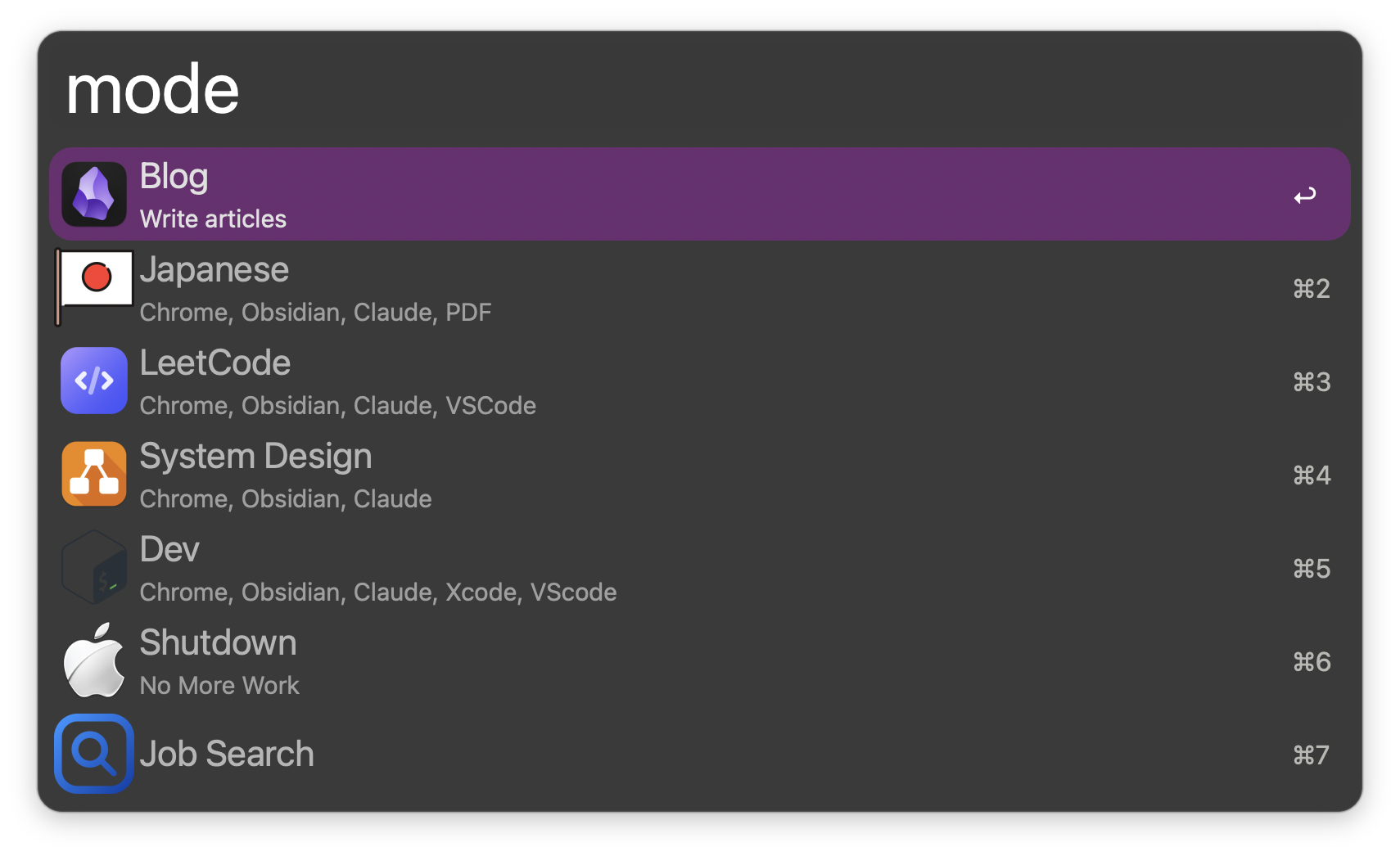
Alfred mode List Filter launcher looks like this:
This is how it looks in Alfred Workflow Builder:
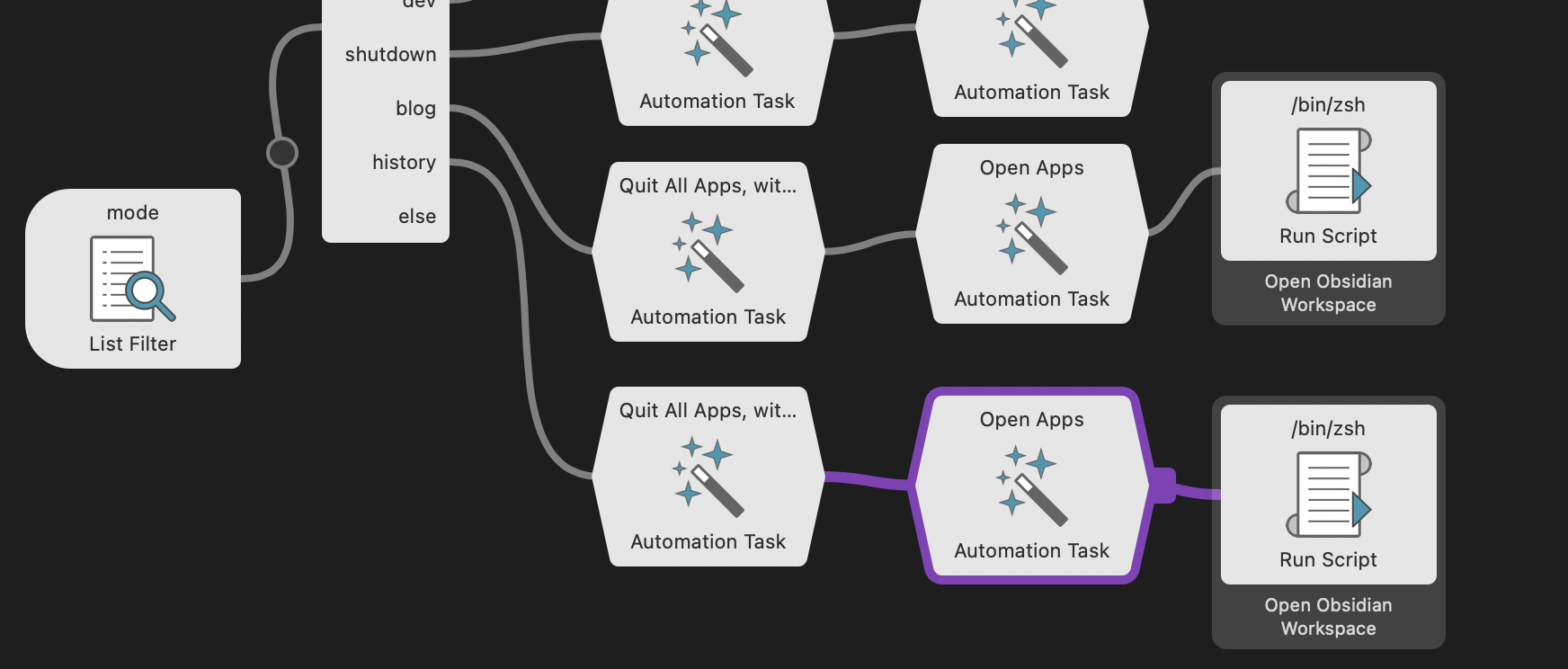
All in all, simple: close apps, open the ones you need, optionally open specific workspaces in Obsidian or relevant tabs in Chrome.
Preliminary Results
This post was written in “mode: blog”.
- While writing this post I have not switched a single time to an app that is not related to the task
- There are no browser tabs to trigger some thoughts even if I accidentally switch to Safari
- No Task Manager to trigger thoughts about future tasks
Bonus Mode: Shutdown
In the book Cal Newport suggests to have a “shutdown ritual” to make a clear separation between work time/tasks and personal time (historically this is something that used to be terrible at. Ok, ok, I still am).
I added such mode, so that when I finish for the day, this mode closes all apps except Obsidian. Not seeing terminal being on 100% of the time is new to me. I did use Claude Code less in the evenings for “just this little thing I want to finish”, which is undoubtedly a good sign.
Conclusion
Increasing focus comes down to:
- Choosing physical environment with fewer things/movements around you to get your attention
- Choosing virtual environment that contains only the tools that you need and nothing else
- Consistently sticking to 1 and 2 for best results
Focus on your work.
🧘♂️
Notes
You can read a short summary by Shortform here for free: https://www.shortform.com/summary/deep-work-summary-cal-newport ↩︎
I wrote about it a couple of weeks ago: I Reviewed My Digital Consumption and Dropped Most of It ↩︎
I started to write on my iPhone in the early mornings too after workout, but as such these are mere drafts. Proper writing/publishing happened in the cafe only ↩︎
E.g if I press and briefly hold “\” and press “C” - Chrome becomes active. “S” makes Safari active and so on. ↩︎
Kata is a Japanese word (
型or形) meaning “form”. It refers to a detailed choreographed pattern of martial arts movements. ↩︎